Adobe to unveil Production Premium CS6 at broadcasters confab


National Association of Broadcasters convention will host debut of Premiere Pro CS6 and related video software

Complete Coverage
Similar Articles
-
Premiere Pro CS6's aesthetic and workflow improvements boost editing efficiency
-
Premiere Pro CS6's enhancements are more than skin deep
-
Adobe Creative Suite 6 launch propels design, Web, and video apps onto center stage
-
After Effects CS6 showcases rebuilt, enhanced compositing and motion graphics tools
-
Adobe Creative Suite 6 goes on sale
-
Adobe launches Creative Suite 6 alongside new Creative Cloud subscription service


Among the programs planned for showcase to convention attendees are Premiere Pro, After Effects, Audition, Story, Media Encoder, Encore, and newcomers SpeedGrade, a film finishing and color grading app, and Prelude, for ingest, logging, and transcoding. The impending release of Production Premium CS6 will provide a multitude of improvements to Adobe's video applications. Here are some of the highlights.
Demos will take place at Adobe's booth #SL2624 in the Las Vegas Convention Center from April 16 through 19. Demos will also take place in more than 60 partner booths throughout the exhibition.
 Premiere Pro CS6
Premiere Pro, Adobe’s flagship video editing software package, is
targeted to a wide range of users, such as editors and post-production
pros, motion graphics designers, visual artists, and photographers
shooting video.Updates include both new features and improvements in interface, workflow, image stabilization, enhanced multicam editing, and a newly enhanced Mercury Playback Engine. The program provides native support for more pro level cameras and more powerful color workflows.
Interface enhancements The new version of Premiere Pro starts off with a new default two-up workspace, which positions the Source Monitor and the Program Monitor side by side to allow more room for the video display. The monitor panels have been redesigned to be less cluttered and more customizable. The Project panel, Media Browser, Info panel, and Effects panel are set at the lower left while the Timeline panel and Audio Meters panel are at the lower right.
The original default workspace is still available from the Workspaces menu, and you can save customized workspace layouts with each project file.
Taking a page from its sister app, the audio oriented Audition, Premiere Pro CS6 offers a redesigned and more functional audio mixer. Double-clicking a fader returns it to 0dB, and the mixer includes separate decibel-level scales for meters and faders. The mixer panel provides fast, accurate visual feedback about audio signal levels. Faders automatically scale when you resize the panel.
New Project Panel views let you view, sort, and arrange your media more easily by viewing resizable 16:9 thumbnails of your clips directly in the Project panel. Also included are a resizable thumbnail view in the Media Browser panel and a new time ruler bar in the Source Monitor, Program Monitor, and Timeline panels. New markers are now displayed in color. Thumbnails are live-scrubbable for preview inside the Project Panel.
Workflow improvements This version of Premiere Pro offers multiple improvements to trimming features. The new Trim Mode in the Program Monitor provides a two-up display showing the outgoing and incoming frames. Buttons for performing some trim functions and applying default transitions, as well as counters that can track the number of frames trimmed, are located beneath the two-up display.
Additional workflow improvements include keyboard shortcuts for trimming, more customizeable keyboard shortcut sets, and gestural control. The program now updates sequence settings to match clips, lets you apply effects and adjustment layers quickly and easily, and offers enhanced flexible audio effects.
Image stabilization Premiere Pro CS6 includes and improves upon a much-anticipated feature introduced in After Effects CS5.5—Warp Stabilizer. When you apply the Warp Stabilizer effect to a clip, the program takes care of the analysis and stabilization without further input. Warp Stabilizer processes individual areas of the frame separately to compensate for parallax.
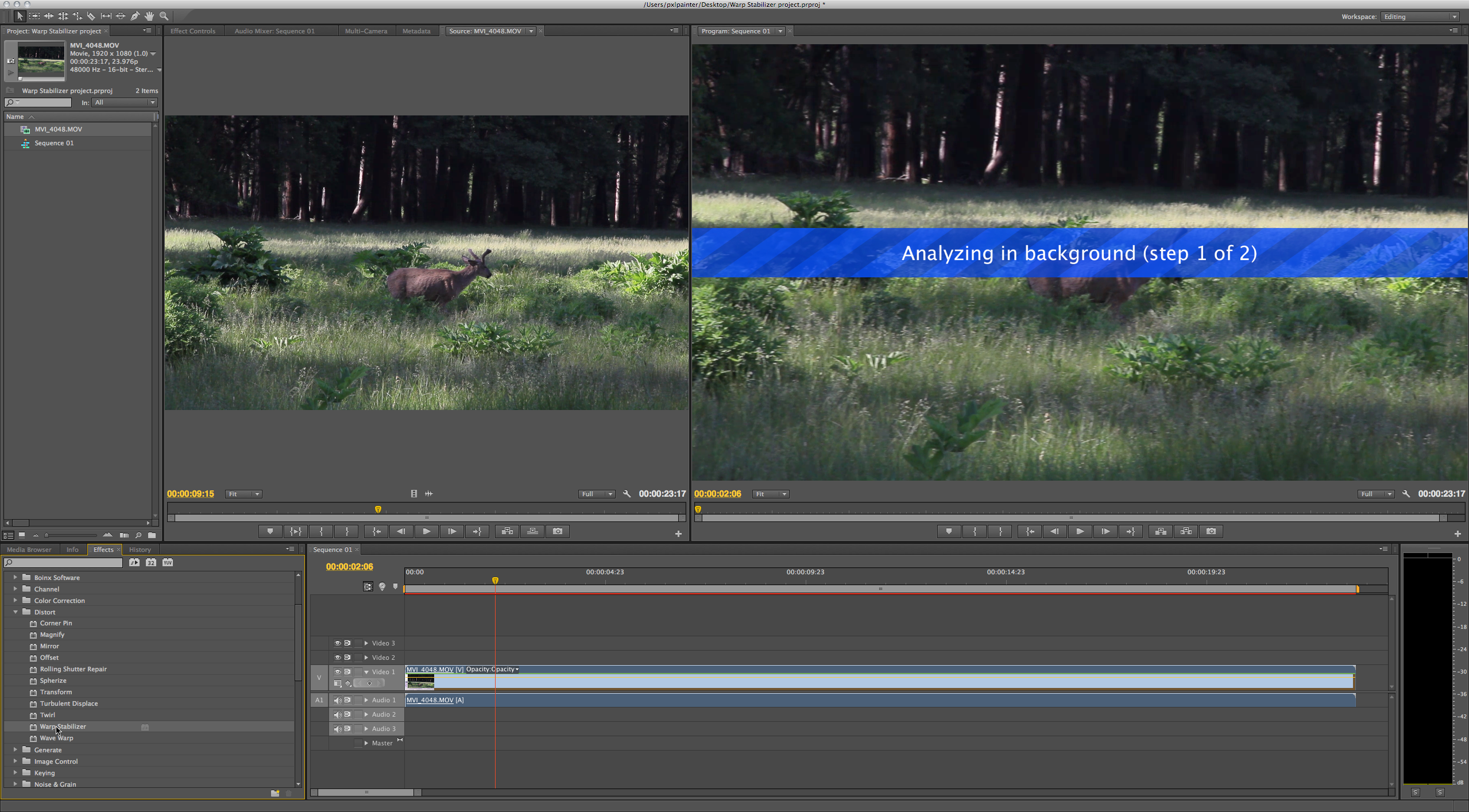
The same power Warp Stabilization controls previously only available in After Effects CS5.5 are now available in Premiere Pro CS6.
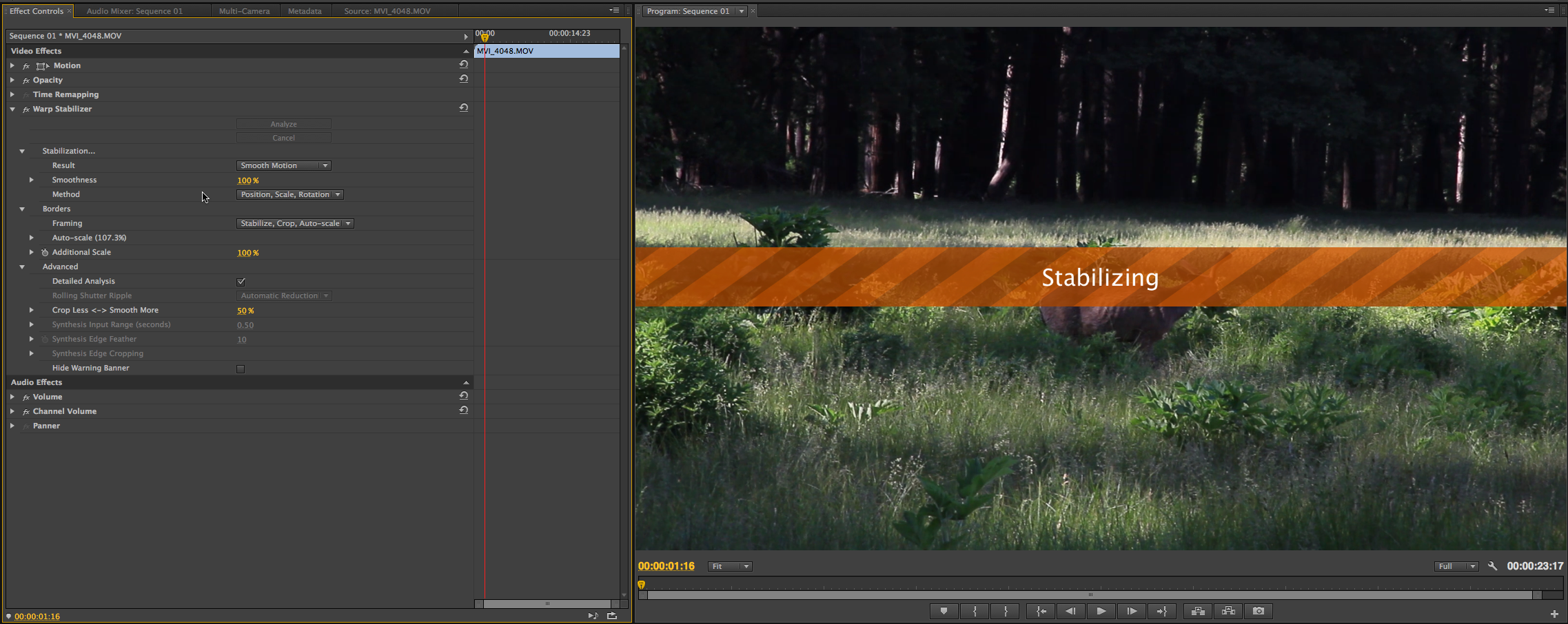
Warp Stabilizer works in the background to analyze and stabilize a shot while allowing you to continue editing. Because Warp Stabilizer is optimized to take advantage of GPU acceleration, users with supported Nvidia GPUs or some MacBook Pros running OS X 10.7 with a supported AMD RadeonTM GPU and a minimum of 1GB of VRAM, will see even better performance.
The new Rolling Shutter Repair effect allows you to correct distortion artifacts that result from scanning a CMOS imaging sensor, typically presented in DSLR footage, vertically or horizontally.
during recording to correct problems like wobble, skew, and smear.
Expanded multicam editing The new version of Adobe Premiere Pro offers expanded multicam support, allowing you to work with as many cameras as you want. Previously, you could work with multicam footage from four cameras. Now, you’re limited only by the formats you’re working with and the power of your editing computer.
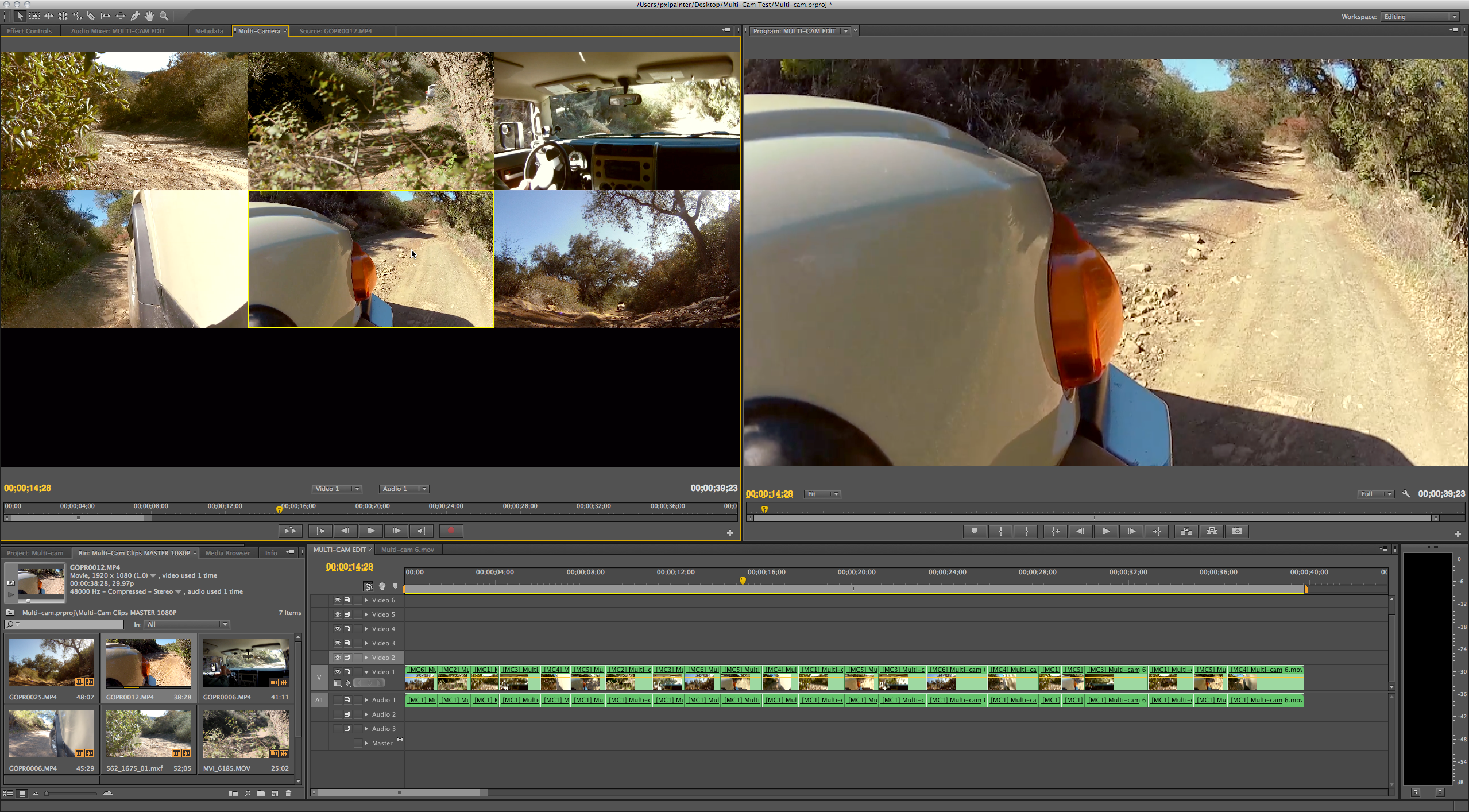
Premiere Pro CS6 has better Multi-Camera support, with many more simultaneous cameras selectable in the monitor.
The Multi-Camera Monitor plays the footage from each camera in a grid that automatically adjusts to accomodate the number of cameras in your shoot and a preview of the recorded sequence. After you’ve created a multicam edit, you can refine it either by re-performing sections of your edit from within the Multi-Camera Monitor or by using traditional editing tools, applying effects, or correcting color.

Live video scrubbing in the scaleable thumbnails inside the new Clip Bin.
Mercury Playback Engine If you're familiar with Premiere Pro CS5 or CS5.5, you already know the Mercury Playback Engine, technology that uses the graphics processor rather than CPU to boost video editing performance. GPU acceleration via supported Nvidia graphics cards and new support for OpenCL-based AMD Radeon HD 6750M and AMD Radeon HD 6770M graphics cards—coupled with at least 1GB VRAM on certain MacBook Pros running OS X 10.7—offer improved mobile workflows to Mac users, according to Adobe.
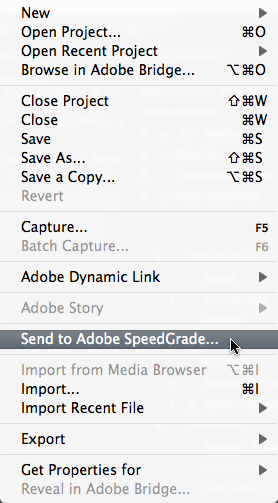
You can send your entire Premiere Pro CS6 sequence to SpeedGrade for professional color grading in the raw, native formats without having to render first.
With these cards, you will see results instantly when vector keying with the Ultra keyer, applying blend modes, correcting color with PremierePro's new Three-Way Color Corrector, and with many other effects. The new version also features expanded third-party I/O support for vendors like Aja, Black Magic Design, Matrox, and others.
Native footage support With this release, Premiere Pro gets native support for ARRIRAW footage shot with ARRI Alexa cameras as well as support for HD (1920-by-1080) and 2K (2880-by-1680) ARRIRAW files at a variety of frame rates. Building on its support for RED digital cinema workflows, Adobe Premiere Pro CS6 includes native support for RED R3D and RMD files—including 5K resolution footage—shot with RED SCARLET-X and RED EPIC cameras. There's also native support for Canon XF MPEG-2 50mbps format footage shot with Canon Cinema EOS C300 cameras.
Suite interaction The new version of Premiere Pro CS6 offers a more intuitive three-way color corrector, integrated color grading workflows with the new Adobe SpeedGrade, efficient ingest and logging with Adobe Prelude, improved, workflows with Apple's Final Cut Pro and Avid software, and the ability to author and publish DVDs, Blu-ray discs, and Web DVDs faster with 64-bit Adobe Encore CS6.
 After Effects CS6
After Effects CS6 is a new version of Adobe’s motion graphics
software targeted to visual effects artists, video editors, post
production professionals, and interactive designers. New features
include global performance cache, 3D Camera Tracker, a revamped Ray
Trace 3D rendering engine, variable mask feathering, Pro Import After
Effects, and more.Global performance cache This feature is an under-the-hood improvement that lets After Effects take full advantage of computer hardware. Its technologies include global RAM cache, persistent disk cache, and a new graphics pipeline.
The program's improved frame caching system allows you to reuse elements and experiment with ideas without having to wait for a previously created frame to re-render.
With persistent disk cache, After Effects CS6 lets you reopen an earlier project with your previously rendered cache still intact, and ready for immediate preview, playback, and rendering. You can also render and cache a composition’s work area to disk in the background while you continue to work.
With the new graphics pipeline, After Effects CS6 makes better use of OpenGL and your computer's video card when drawing images to the screen. You get faster interactivity, a more responsive work environment, and a smoother, more immediate experience, Adobe says.
3D Camera Tracker The new 3D Camera Tracker effect automatically analyzes the motion in 2D footage and computes the position, orientation, and field of view of the actual camera that shot the scene and creates a new 3D camera in After Effects to match it. It also overlays 3D track points onto the 2D footage, making it easy and intuitive for you to attach new 3D After Effects layers onto the original footage.
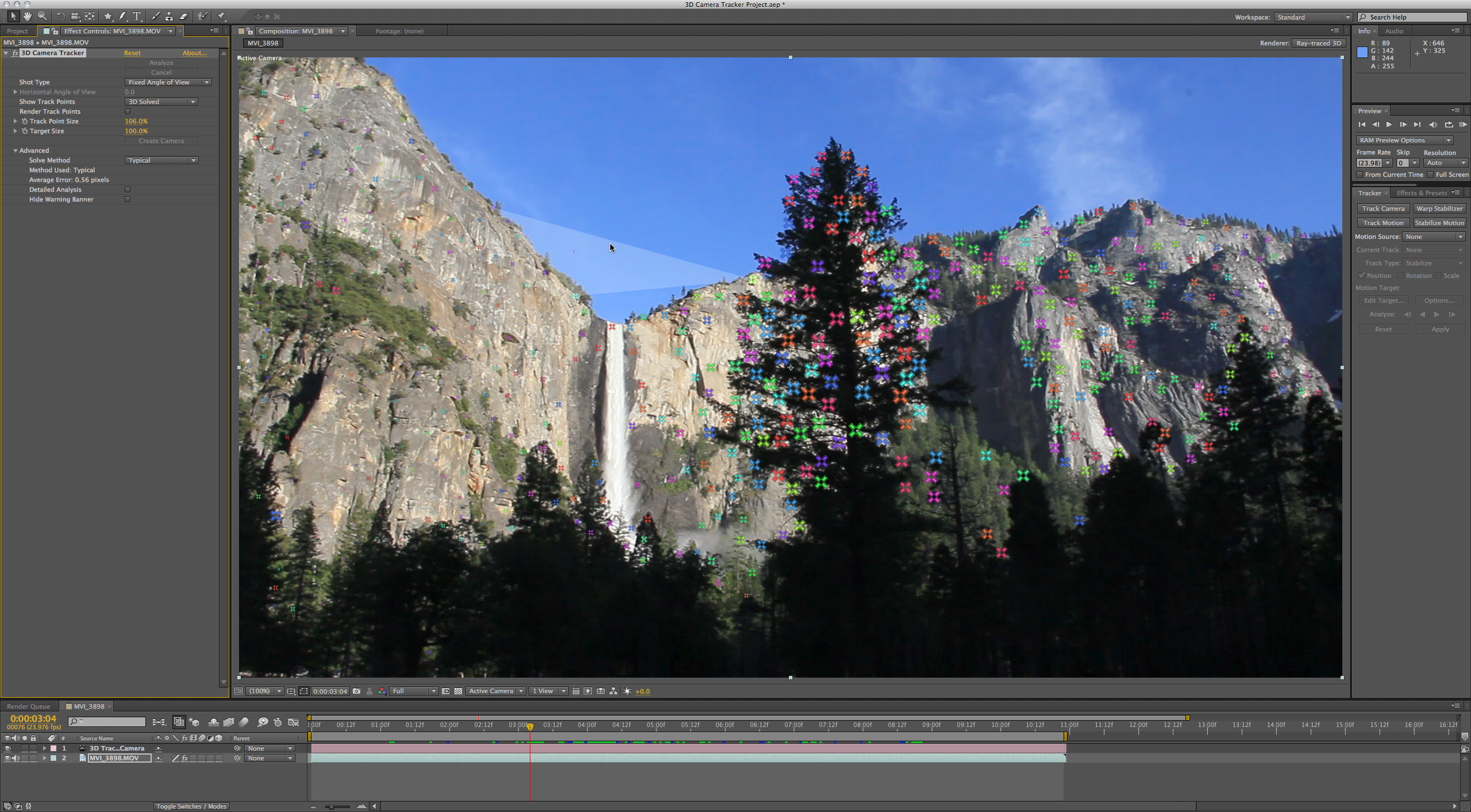
3D Camera Tracker analyses and creates track points in depth within footage.
Ray Trace 3D engine After Effects CS6 introduces a new Ray-Traced 3D rendering engine, allowing you to quickly design fully ray-traced, geometric text and shape layers in 3D. Enhanced 3D capabilities include beveled and extruded text and shape layers, the ability to bend footage and composition layers, adding dimension for more interesting lighting effects; and environment map support for photorealistic reflections of virtual imagery. Additional material options include reflection, transparency, and index of refraction to mimic light traveling through glass and other translucent materials.
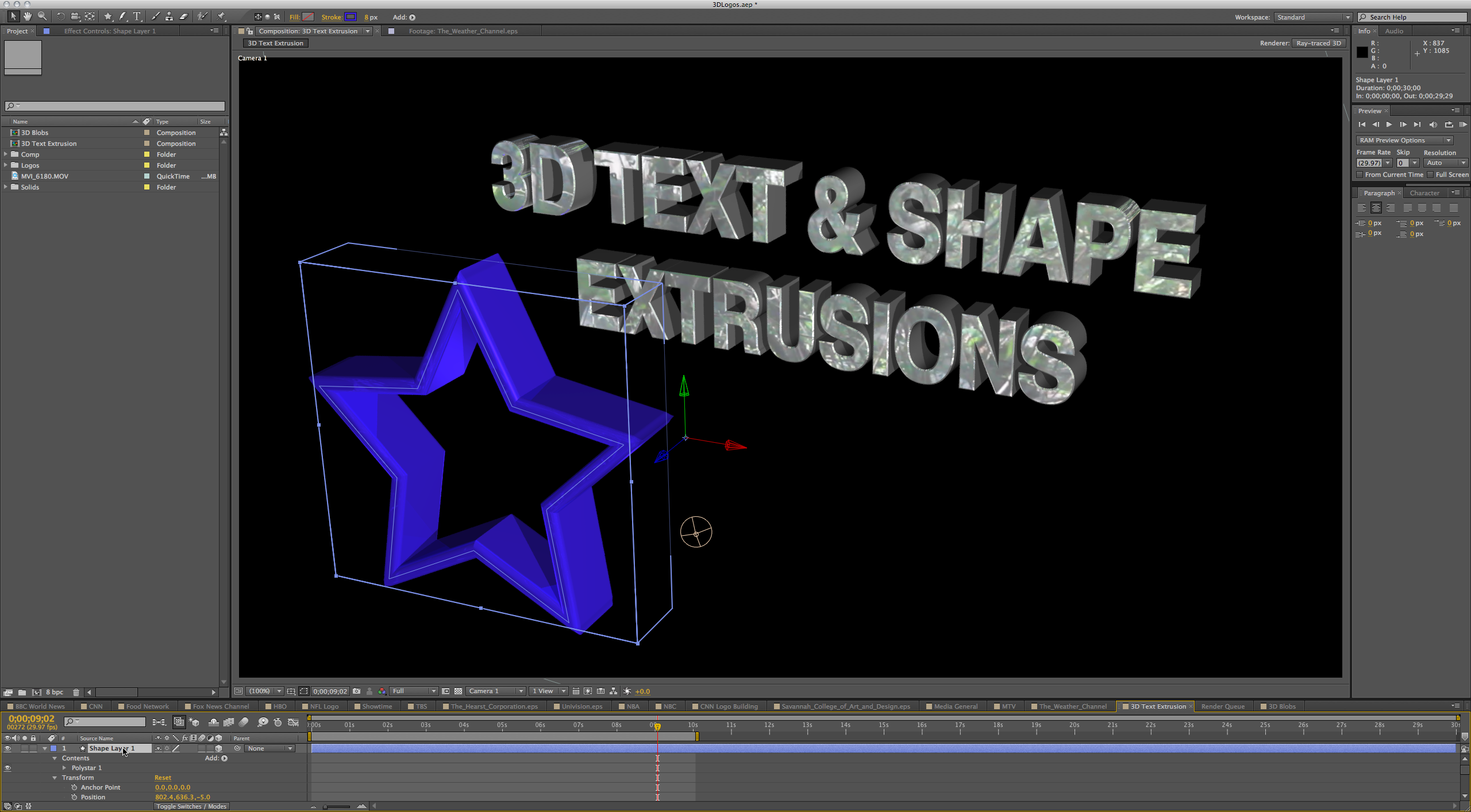
3D Text and shape extrusions can also be applied to converted Illustrator layers.
Variable Mask Feathering With the new Variable Mask Feathering, you can work precisely and create the exact shape you want with the proper degree of softness at the edges, yielding more realistic composites. After Effects has long had the ability to add a feathered soft edge to masked shapes, but in previous versions the width of the feather was the same around the entire mask. After Effects CS6 contains a new Mask Feather tool that lets you define almost an infinite number of points along a closed mask, and define the width of the feather at each of these points.
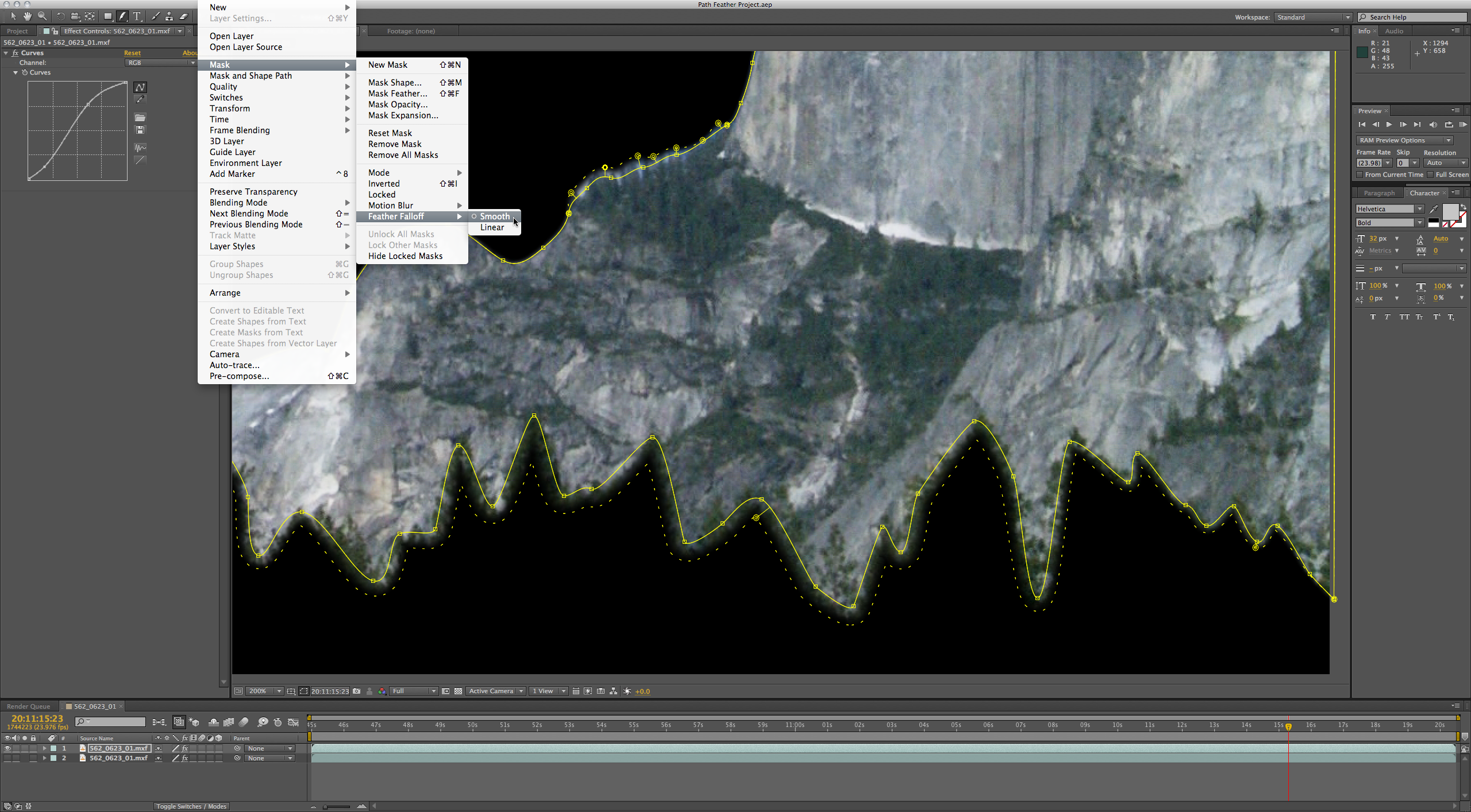
Variable edge feathering along mask paths.
An advanced Rolling Shutter Repair effect contains two different selectable algorithms to help fix problematic footage. After Effects CS6 also makes it easier to enhance the production value of your projects, with more than 80 new and updated built-in effects.
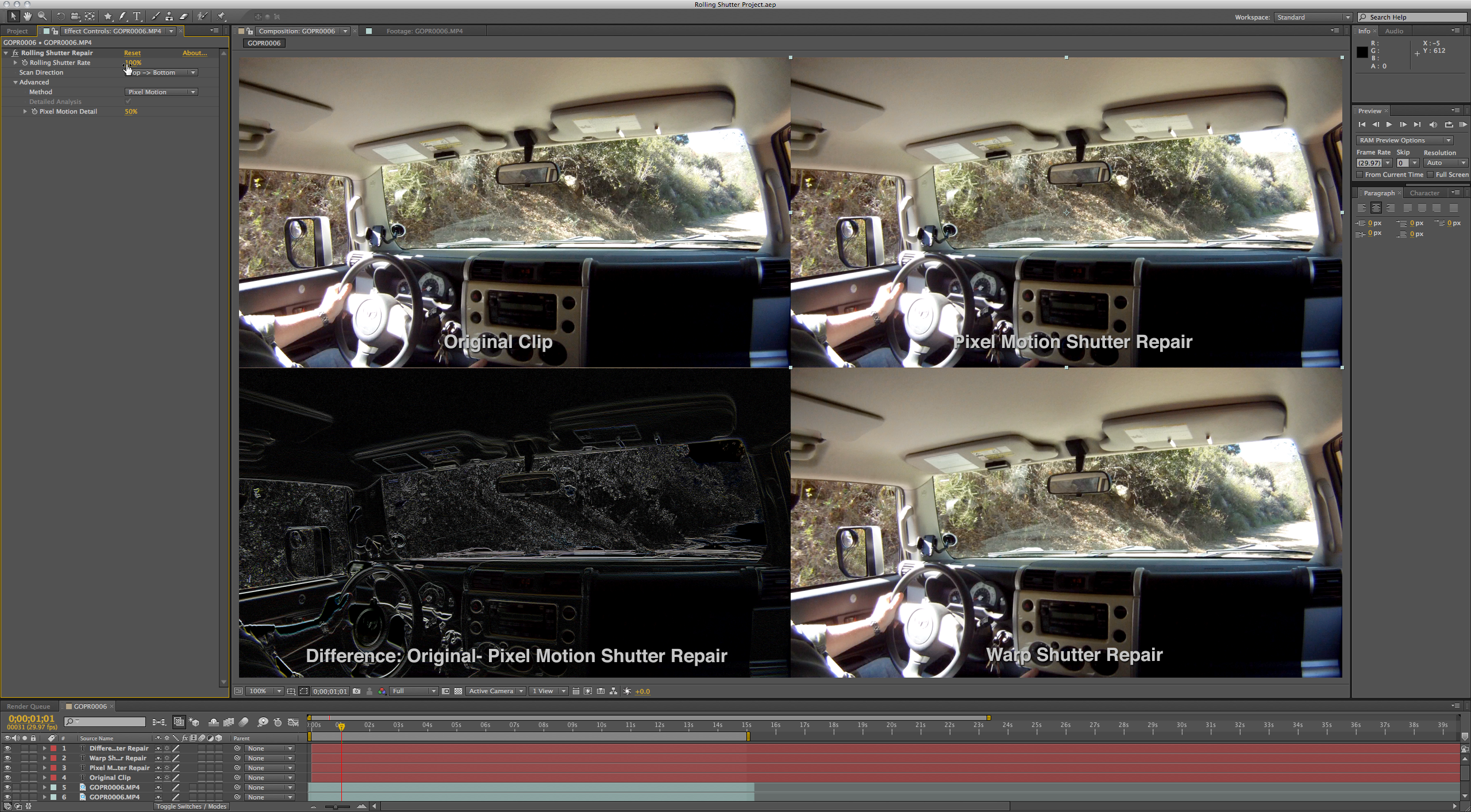
Rolling Shutter repair for DSLR footage.
Pro Import After Effects Previously available as a separate product from Automatic Duck, Pro Import After Effects is now included with After Effects CS6.
In addition to the integration with Adobe Premiere Pro CS6 software inside the Adobe Creative Suite 6 Production Premium and Master Collection, this utility plugs After Effects into any professional production workflow. It lets you import and work with Avid Media Composer and Symphony files, as well as XML files from Apple Final Cut Pro 7 or earlier versions. It translates many effects and parameters from supported Avid and Apple files into After Effects, including position, scale, rotation, keyframes, composite modes, titles, speed changes, and more.
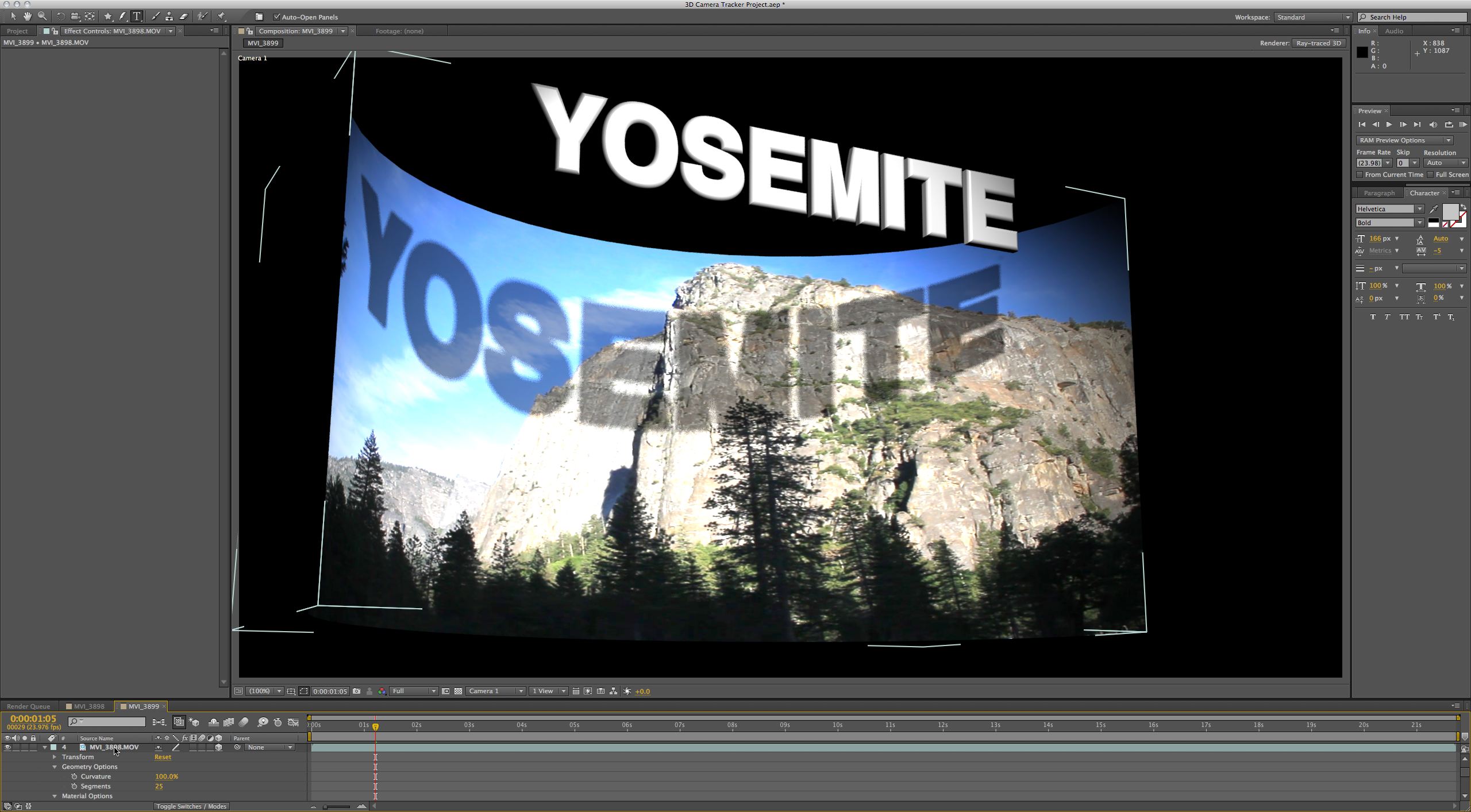
3D comp and footage layers can now be bent.
Improved mocha workflow After Effects CS6 now includes a Track In mocha AE menu command that lets you launch mocha AE directly from within the program. That lets you immediately begin working with the per-vertex feathering and other masking tools available in mocha AE, as well as in mocha shape.
 Prelude CS6
Adobe Prelude CS6 provides a unified interface for ingest and logging
workflows, allowing you to work faster, stay organized, and streamline
your production process. This software lets you copy and transcode to
your storage infrastructure and begin logging immediately, adding
searchable markers and other metadata. It also creates rough cuts with
post-production notes that flow into Adobe Premiere Pro CS6, to
communicate the vision for the project through final editing.Full or partial ingest Prelude CS6 lets you ingest all your footage at once, or select and ingest just a portion of it. You also have the option to transcode the files to your preferred format.
Performing a full ingest means transferring your entire video file to your hard drive and preparing it for logging and handoff. Open the Ingest workspace, navigate to your files, select the files to ingest, and then click the Ingest button. A partial ingest is also easy. Open the Ingest panel, navigate to your files, and click on the video’s thumbnail. While watching the video, drag the playhead and press the I key to set the In point. Drag the playhead to the desired Out point and press the O key. Click the Transcode option, and then click the Ingest button. Your partially ingested video clip—the file you will send for editing—is now listed in the Project panel.
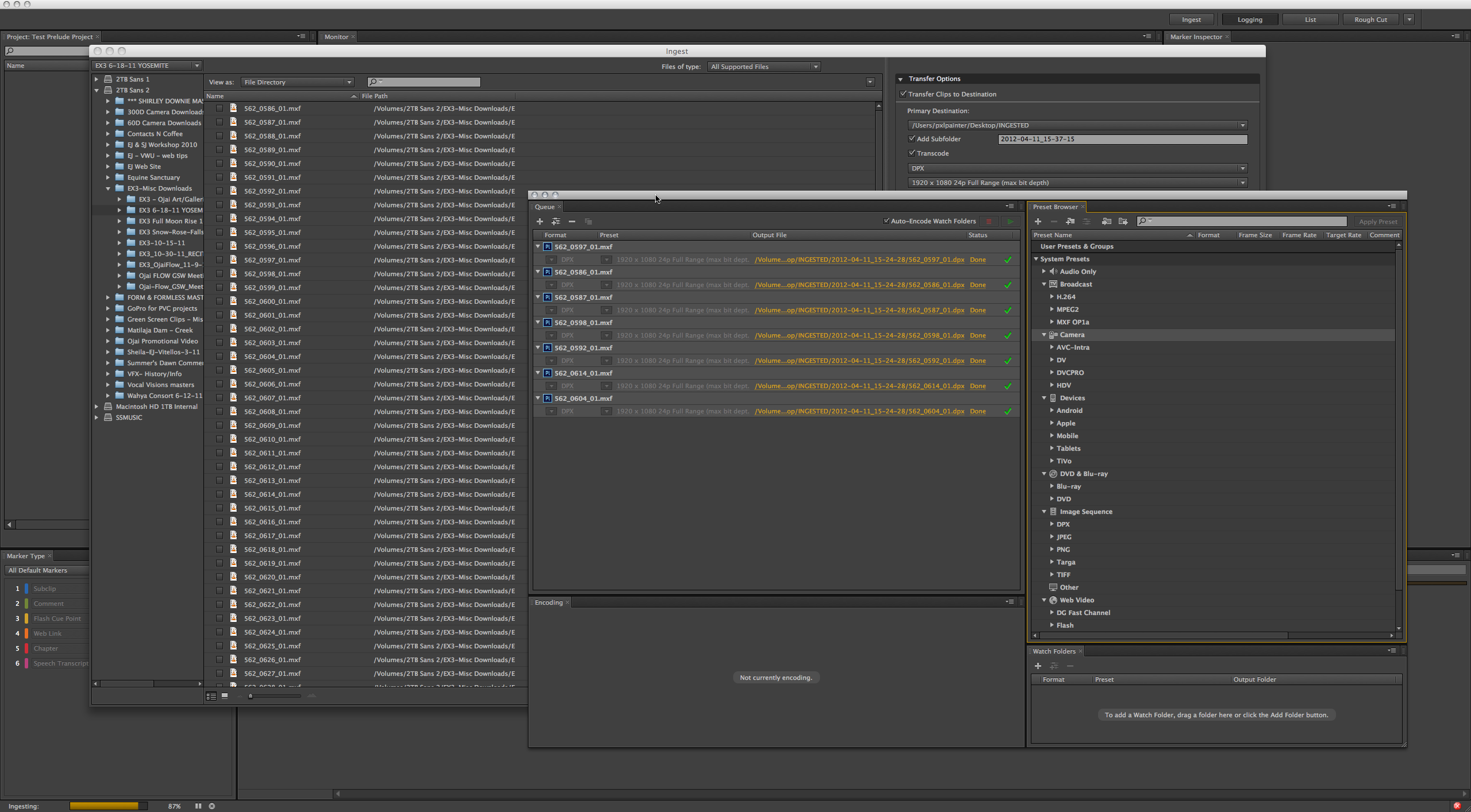
dobe Prelude CS6 allows you to ingest footage to your hard drive and and transcode on the fly.
Transcoding during ingest Prelude CS6 gives you the option of transcoding footage to your preferred editing format, thus optimizing storage. You select the Transcode option in the Transfer Options panel and are given the option to select the format and presets for the file.
The program also offers keyboard driven logging, searchable time-based markers and metadata, rough cuts that open in Premiere Pro, write confirmation, speech transcription, and customizable markers and metadata import.
Prelude replaces OnLocation, which shipped in early versions of the Production Premium, though not all OnLocation features are available in Prelude CS6, such as live monitoring with Waveform or Vectorscope feedback.
 Audition CS6
Adobe Audition CS6 provides a unified audio editing and mixing
environment for video and broadcast workflows. Targeted to audio
engineers and broadcast editors as well as video professionals, Audition
CS6 features roundtrip editing in conjunction with Adobe Premiere Pro
and smooth project exchange with third-party nonlinear editors and
digital audio workstations.This version offers new features for editing and sound design, such as real-time clip stretching, automatic speech alignment and pitch correction, expanded production capacity with control surface support, recordable track automation, multiple clipboards, HD video playback, native 5.1 surround editing, and audio sweetening and restoration tools.
Building on past releases, Adobe Audition CS6 offers broader support for audio and video formats and increased output options including Redbook CD burning and compliance with the latest ITU loudness standards. New features for industry-standard metadata include AES-46 Cart Chunk, integration with radio automation systems, and other broadcast workflows.
Audio editing enhancements include clip grouping with Group Suspend, preview of edits with Skip Selection playback mode, new precise entry of envelope keyframe values, and fast clip spotting with start- or end-time entry.
Faster and more precise audio editing features include clip grouping, trim to time election, edit preview with skip selection, envelope keyframe editing, direct clip editing in the Properties panel, multiple clipboards, real-time clip stretching, auto speech alignment, control surface and app support, and pitch controls.
Audition CS6 improves on asset management to let you find the files you need more quickly. Panels such as Media Browser, Files, Markers, and Session let you view your files on local and networked drives, find files by typing in just a part of the name, view all markers in your section in one window, and create session templates that speed up recording files.
Audition CS3 also offers expanded audio and video formats, New effects, VST3 support, and flexible effects routing, enhanced support for radio automation, improved batch processing, and a new metronome.
 SpeedGrade CS6
SpeedGrade CS6, a full color grading and finishing tool, is targeted
to editors, motion graphics and vidual effects artists, and professional
colorists, is a new addition to the Adobe lineup. The technology for
the program, formerly from a company called Iridas, was acquired last
September.The program now offers a sleek new interface and and is engineered for modern file-based workflows. It is a native 64-bit application with GPU-accelerated performance and support for raw, HDR, and stereoscopic content. It's compatible with footage from digital cinema cameras such as ARRI ALEXA and RED and with popular post-production interchange formats such as QuickTime, DPX, and OpenEXR. The program ensures that all your shots are accurately matched and every project is styled using layer-based tools for color correction and look design. Resize and reframe your final masters for virtually any display format.
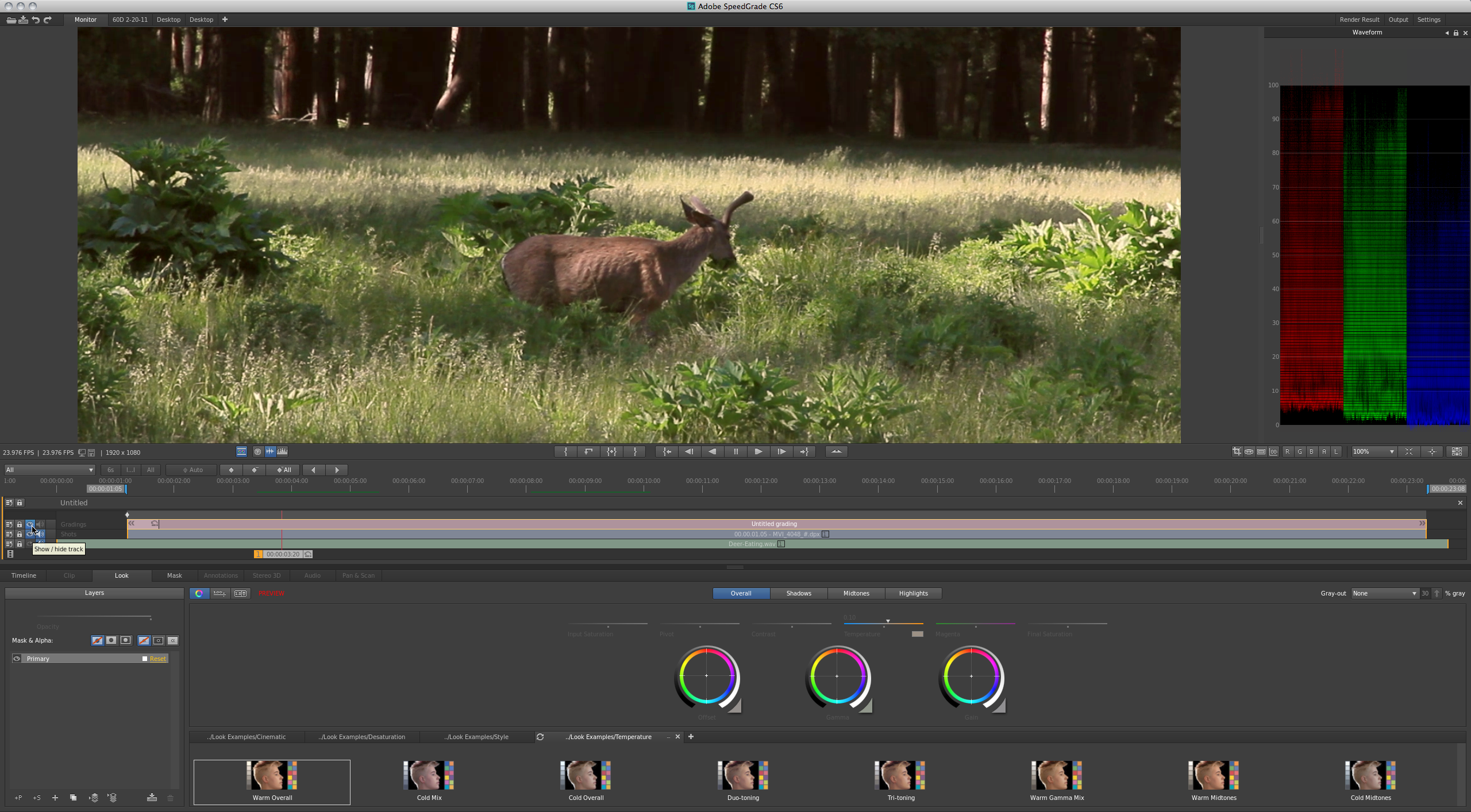
SpeedGrade is a powerful color grading tool with advanced controls and features previously only found on high-end editing systems.
Lumetri Deep Color Engine The non-destructive Lumetri Deep Color Engine is a 32-bit floating-point image-processing technology at the heart of SpeedGrade CS6. It offers maximum scope for working with High Dynamic Range content, allowing you to pull details from blacks and highlights that might otherwise be lost. It also allows you to work directly with raw files, the digital negative from your camera sensor. You can combine and refine looks, effects, and new grading layers without having to commit to any color decisions until final rendering.
Color corrections, masks, and filters are applied as layers, making it easy to use simple elements to build up and make adjustments to complex grades. You can add, remove, combine, and rearrange grades and effects, and adjust the influence of each layer with its own opacity slider. You apply primary color corrections to the whole image and secondary color corrections to specific color ranges. SpeedGrade CS6 allows you to define a very narrow color range for a secondary to, say, emphasize a specific element in the image, like skin tones. You can also use broader secondary color ranges when you want to showcase rich greens in a forest or red shades of a sunset.
Masks are part of the layer structure and can be positioned as easily as any other layer, so that color corrections are applied to the areas inside, or outside, your mask.
SpeedGrade CS6 includes a selection of professionally designed Looks, film-style filters, and effects, in addition to the application’s color adjustment tools.
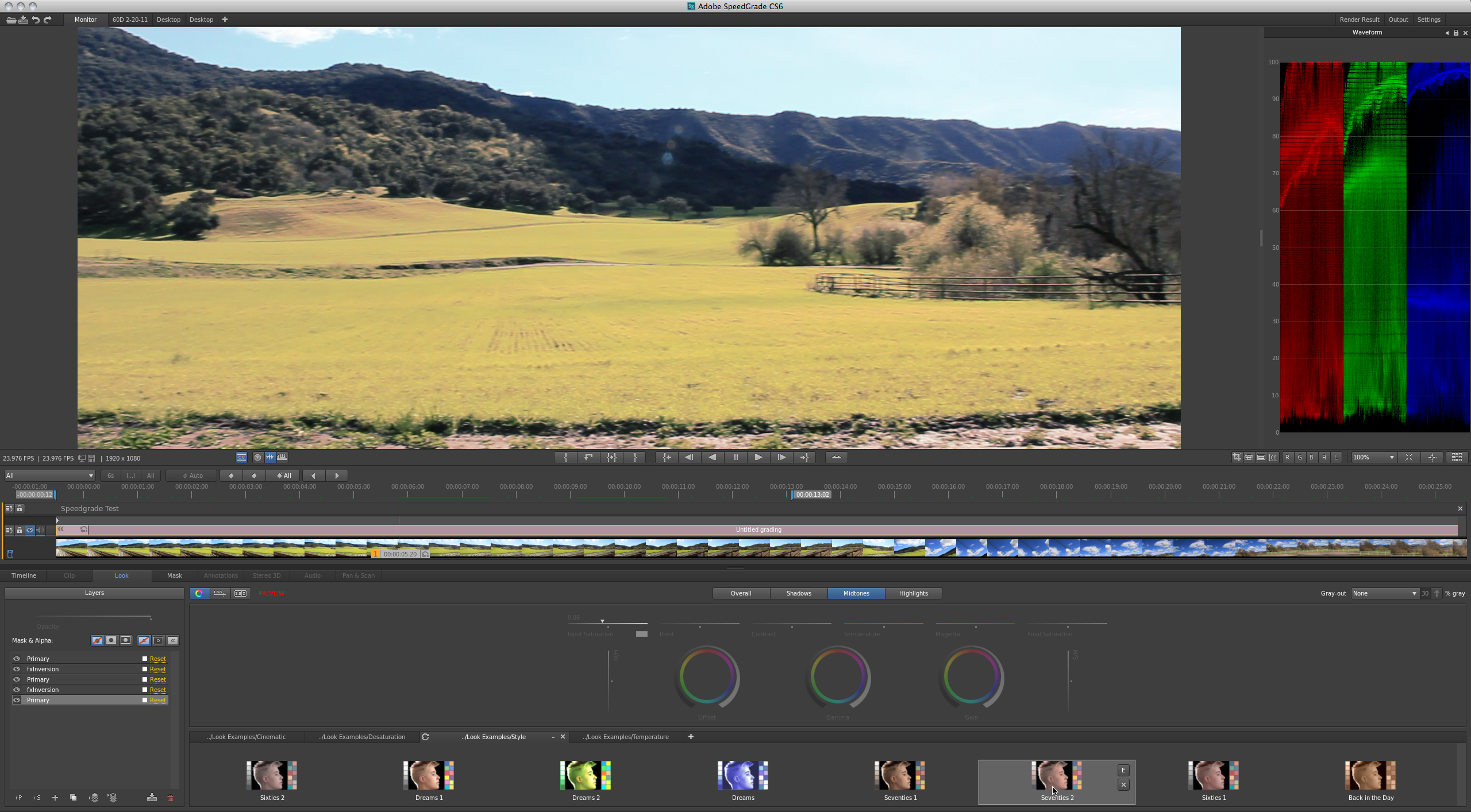
There are many great Look presets that you can apply and modify to best suit your needs, including classic film stocks.
For stereoscopic projects, SpeedGrade CS6 loads stereo 3D frame sequences, offers multiple viewing options, features automatic geometric and colorimetric correction, and display support.
Automatic scene detection and Pan and Scan features automatically identify edits from archived projects and allow you to reframe content for virtually any deliverable format.
System requirements
Adobe Production Premium CS6 runs of both Mac and Windows operating systems. Mac requirements include a multicore Intel processor with 64-bit support, Mac OS X 10.6.8 or 10.7, at least 4GB of RAM (8GB recommended), 4GB of available hard-disk space for installation; additional free space during installation (software cannot install on volumes that use a case-sensitive file system or on removable flash storage devices), additional disk space for disk cache (10GB recommended), a 1280x900-pixel display, and an OpenGL 2.0–capable system.For Windows, requirements include an Intel Core 2 Duo or AMD Phenom II processor with 64-bit support, Microsoft Windows 7 with Service Pack 1 (64 bit), at least 4GB of RAM (8GB recommended), 3GB of available hard-disk space; additional free space during installation (software cannot install on removable flash storage devices), additional disk space for disk cache (10GB recommended), a 1280x900-pixel display, and an OpenGL 2.0–capable system.
Adobe has not revealed the actual date when CS6 and Creative Cloud will launch, but has indicated it will be within the first half of 2012. The prices of the new versions also have not been announced.
In related news, on Sunday, April 15 at 10:30 a.m. in room N249, Adobe will participate in the Post|Production World keynote, “How Creativity and Technology Merge to Influence Storytelling and Film.” Participants will include Steve Wozniak, Fusion-io Chief Scientist; Vincent Brisebois, visual computing industry manager at Fusion-io; Rob Legato, Academy Award winning visual effects supervisor, and Steve Forde, Adobe After Effects product manager. They will discuss how creativity and advances in digital technology can work together to develop engaging stories.
[Jackie Dove is a Macworld senior editor. All screenshots were produced by Jeff Foster, a Macworld contributor.]
Source: http://www.macworld.com/article/1166299/adobe_to_unveil_production_premium_cs6_at_broadcasters_confab.html
And highlights form gearslutz.com
Audition CS6: what's new and changed
Preview Video
Audition CS6 Highlights:
Audition CS6 (nearly) Complete List of New Features:
Multitrack
Waveform (Editor)
Effects
General
Broadcast Specific
Control Surface/Automation
Format support
Output
Preview Video
Audition CS6 Highlights:
- Real-time and rendered clip stretching in multi-track - including new “varispeed” mode
- Clip Grouping – Including suspend, trimming, & stretching of groups
- VST3 support (Mac and Win) and more effects
- New pitch correction/manipulation tools
- Automatic speech alignment tool
- Red Book Audio CD burning
- Hardware controllers support - Including native Avid EUCON and Mackie MCU support
- Write/Touch/Latch automation modes
- Media browser with file preview
- Session Templates and Enhancements
- Expanded file format support (Native, libsndfile, DLMS)
Audition CS6 (nearly) Complete List of New Features:
Multitrack
- Session templates
- Automatic speech alignment
- Clip grouping
- * Suspend mode
- * Focus clip actions
- * Trim/fade grouped clips
- * Time aligned stretching of groups
- Clip spotting – Manual entry of clip start or end time
- Clip stretching - Real-time and rendered mode using iZotope Radius
- Vari-speed clip stretching
- Skip selection play mode
- Metronome
- Save all open files with session preference
- Select all clips from playhead to end of track
- Sum to mono per track
- Bounce selected track
- Reveal clip in files panel
- Trim to selection
- Send clip to back
- Preference to play/hide overlapped clips
- Mixer enhancements
- Snap volume and pan envelopes at 0dB
- Drag and drop file marker range to multitrack (as clip)
Waveform (Editor)
- Multiple clipboards
- Skip selection play mode
- Open append
- Subclip marker support (Premiere and Prelude)
- Improvements to spectral spot Healing
- Pitch display
Effects
- VST3
- Side Chain support
- Improved plug-in scanning engine
- New channel map per effect – Control over effect input and output channel routing
- Save and apply Effect Racks as a favorite
- New/Added effects:
- * Automatic Pitch Correction
- * Manual Pitch Correction with new spectral pitch view mode
- * Generate Tones
- * Doppler Shifter
- * Notch Filter
- * Graphic Phase Shifter
- * Gain / Fade Envelopes
General
- Media Browser
- Preview in Media Browser and files panel
- Search/filter in Media Browser and files panel
- Display markers for all files in markers panel
- Access and open order fields in files panel (sorting)
- Keyboard shortcuts (shortcut editor enhancements, copy to clipboard)
- Adobe Graphics Manager Implementation to improve UI drawing
- DLMS Integration to support additional video and audio file format import/open
- OpenGL display for video including improved video display for improved performance
- New spectral display preferences
- Support for additional framerates (23.976, 59.94 ndf/df)
- Machine-specific device preferences (optional common audio hardware settings for all users)
- Import most preferences from CS5.5
- Pinch-to-zoom, rotate to scrub Mac touchpad support (Mac only)
- Improved properties panel UI layout
Broadcast Specific
- ITU Loudness – Normalize files (batch) to ITU-BS.1770-2 (R128), view loudness level diagnostics
- Native MPEG1-Layer 2 audio (MP2) import and export
- Enhanced CART timer and metadata support
Control Surface/Automation
- Mackie MCU, native Avid EUCON, other controller support
- Recordable track automation (Full Write, Touch, Latch support with undo)
Format support
- MPEG4, HD Video, and additional audio import (via DLMS)
- Native MPEG1-Layer2 (MP2) audio import and export
- Native APE, FLAC, OGG export and import
- libsndfile export – export most formats supported by libsndfile
- CD Import metadata support (via FreeDB)
- Enhanced RAW format support
Output
- Red Book CD Burning (via CD layout)
- Quick burn single-file, CD-TEXT)
- Advanced mixdown – Mixdown tracks, busses and/or master as seperate files
- Save All Audio As batch process
- Save Copies of Associated Files – Collect/archive all files in a session
- Save open file references in session (“remember” all open files with the session)
- Advanced session export – Including ability to convert sample rate of session and associated files
- Preferred asset importer saved with session files
Source: http://www.gearslutz.com/board/new-product-alert/718908-adobe-audition-cs6.html